
Automate insurance and benefits verification.
Hear real payer calls.
Listen to SuperDial handle payer and provider conversations across claim follow-up, benefits verification, authorization status, credentialing, enrollment, and provider data workflows.
Click to play real payer interactions. Follow the waveform, transcript, extracted fields, and final structured result as SuperDial navigates each step.
When an eligibility response isn't enough.
An electronic 270/271 eligibility response is the fastest way to confirm whether a patient's coverage is active, and for many visits it is all your team needs. Some responses stop short of the detail a visit depends on, such as procedure-level coverage, remaining deductible, visit limits, carve-outs or whether an authorization is required.
SuperDial picks up where the eligibility response ends. It runs after your clearinghouse check, uses the portal or the phone to fill in the missing fields, and returns them in the same structured format.
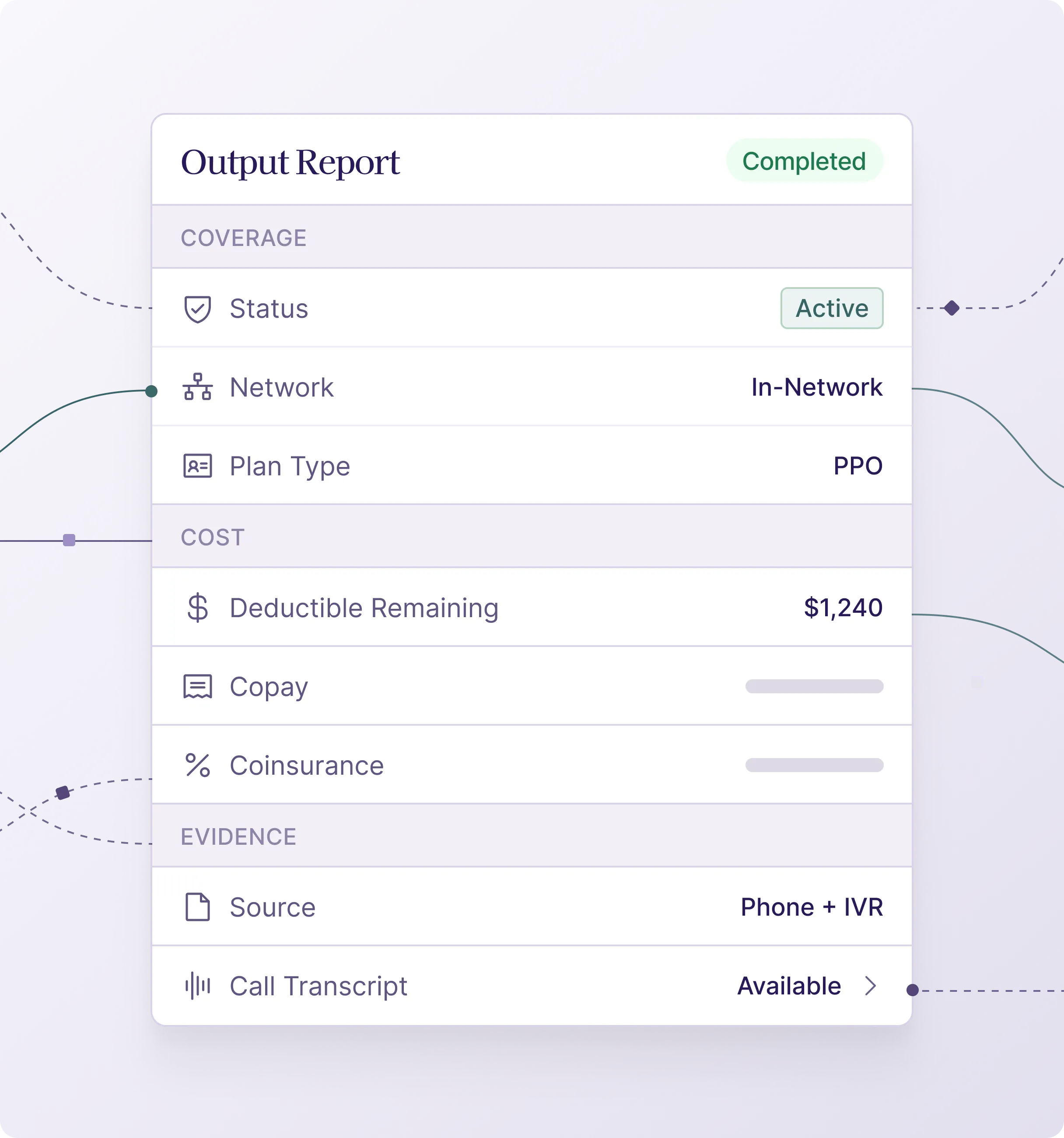
The benefit details your team actually needs.
How It Works
01
01
02
02
03
03
04
04
05
05
06
06
Automate your patient access.
Pre-Visit Verification
Specialty Workflows
Dental and DSO Benefits
Exceptions from EDI
Proven in verification workflows.
See how teams use SuperDial to automate insurance verification calls and the payer follow-up around them.



Where results go and how teams start.
Results can be delivered as structured JSON through the SuperDial API and webhooks, written back to your EHR or PMS where an integration is in place, or exported as CSV. Alongside the benefit fields, results can include summary notes, call recordings, transcripts and source documents.
Most teams start with a pilot on a representative batch, sent as a CSV or through the API. The pilot validates the output schema, the ROI and how exceptions are handled before teams expand into API-triggered workflows, webhooks and write-back.
SuperDial is HIPAA compliant, SOC 2 Type II attested and HITRUST e1 certified, and a BAA is standard before any PHI is exchanged.
Benefits verification automation, answered
What benefit details does SuperDial verify?
Eligibility and plan status, deductible and amount remaining, out-of-pocket maximum, copay and coinsurance, coverage for the specific procedure codes, network status, and whether an authorization is required.
Does this replace our clearinghouse eligibility check?
No. It runs after the 270/271 response, when the EDI reply is missing the detail your team needs, and goes to the portal or the phone to get it.
When do results come back?
Requests run in batches ahead of the appointment date you set, and each result posts as its call completes.
Which specialties use it?
Dental groups and DSOs, intraoperative neuromonitoring, behavioral health, physical therapy and other specialty groups whose benefit questions are code-specific.
How do verification results get back into our systems?
Results can be delivered as structured JSON through the SuperDial API and webhooks, written back to your EHR or PMS where an integration is in place, or exported as CSV. Alongside the benefit fields, results can include summary notes, call recordings, transcripts and source documents, so your team can see where each answer came from.
What happens when a payer can't give a complete answer?
The request comes back to your team as an exception, with a summary of what happened and the recommended next action. The audit trail, including any call recording and transcript, shows what was attempted, so your staff can pick up from there instead of starting over.
How do we get started?
Most teams start with a pilot on a representative batch of patients and the benefit fields they need back, sent as a CSV or through the API. The pilot validates the output schema, the ROI and how exceptions are handled, and teams then expand into API-triggered workflows, webhooks and write-back.
Is SuperDial HIPAA compliant?
Yes. SuperDial is HIPAA compliant, SOC 2 Type II attested and HITRUST e1 certified, and a BAA is standard before any PHI is exchanged. Data is encrypted in transit with TLS and at rest with AES-256, and access is controlled with SSO, MFA and role-based permissions.
Verify benefits without another manual payer call.
Start with a representative batch and define the benefit fields you need back.
